
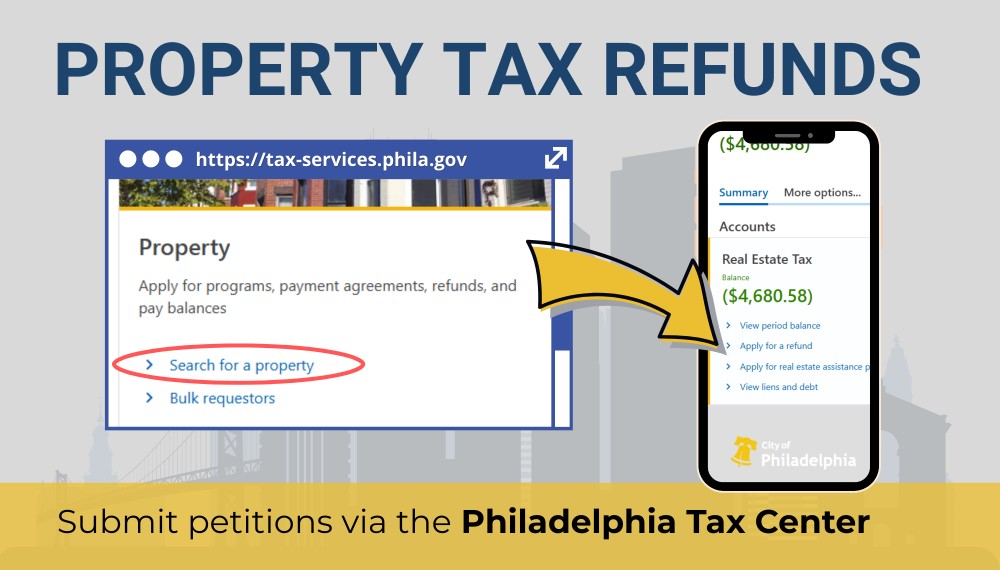
You may be eligible for a Real Estate Tax refund if you overpaid your bill—whether due to a duplicate payment, a change in your property’s valuation, or a billing error. You may also qualify for a refund if a property tax relief program, like the Homestead Exemption, was applied to your account, resulting in an overpayment.
We usually roll over credits to the next tax bill unless you request a refund. The good news is you can apply for that refund online, through the Philadelphia Tax Center. Here’s a step-by-step guide to help you through the process:
Property tax refunds made easy
The Philadelphia Tax Center makes it easy to request any refund, including property tax refunds. Besides letting you view any refundable credits on your account, the site lets you submit a petition without creating a username and password.
Make sure you have your property address or Office of Property Assessment (OPA) number handy before you start. You’ll need it to access your property account on the Tax Center. Also, be ready to share the exact refund amount, proof of payment, and any supporting documents.
Follow these steps:
- Go to tax-services.phila.gov
- Enter your address in the “Search for a property” link on the homepage and select “Search.” Your OPA number shows up in blue on the right. Select it and proceed to the next screen.
- A summary of your property account is displayed on the dashboard. On the right side of the screen, you’ll see a blue “Apply for a refund” link if you have a refundable credit on your account. Select it and enter your entity type and relationship to the property.
- Fill out all the sections on the “Property refund petition” screen. Follow the on-screen instructions to submit your petition.
Keep these in mind
Direct deposit is not yet available for property tax refunds. We only issue paper checks. Our processing time is usually four to six weeks. To avoid delays, make sure your bank and mailing details are correct.
Use the Tax Center’s “Where’s My Refund?” tool to track your petition and get real-time updates. You don’t need a username and password to use the online tracker.
Is your mortgage company paying your taxes?
You can’t request a refund if your mortgage company pays your Real Estate Tax. Only the payee can request a property tax refund. But if your mortgage company allows you to apply for a refund, you must submit a letter from them (on their letterhead) approving the release of funds to you.
Got a property account yet?
Even though you don’t need a username and password to request a refund online, registering your property makes it easier to:
- Update your mailing address or phone number,
- Make or track payments,
- View balances,
- Change your language preferences, and
- Access account history online without waiting in line or over the phone.
Also, with a property account, you can send and receive secure messages from our department. Property accounts are especially helpful for owners or managers of multiple properties. Here’s how to create a property account if you haven’t already:
- Go to tax-services.phila.gov
- Find the “New taxpayers” panel on the homepage and select “Register a new taxpayer.” Pick “Yes” or “No” for “Registration type,” depending on your situation.
- On the next screen, choose “Individual/Sole proprietor” and enter your info. You’ll need your Social Security Number (SSN) to complete this step. For the “business start date” question, enter the date you purchased your property. Follow the on-screen prompts to complete the registration process.
This feature lets you set up an account for your primary residence only. The “Add a property” link lets you add additional properties.
Commercial property owners or managers must add Business Income and Receipt Tax (BIRT) and Net Profits Tax (NPT) accounts during registration.